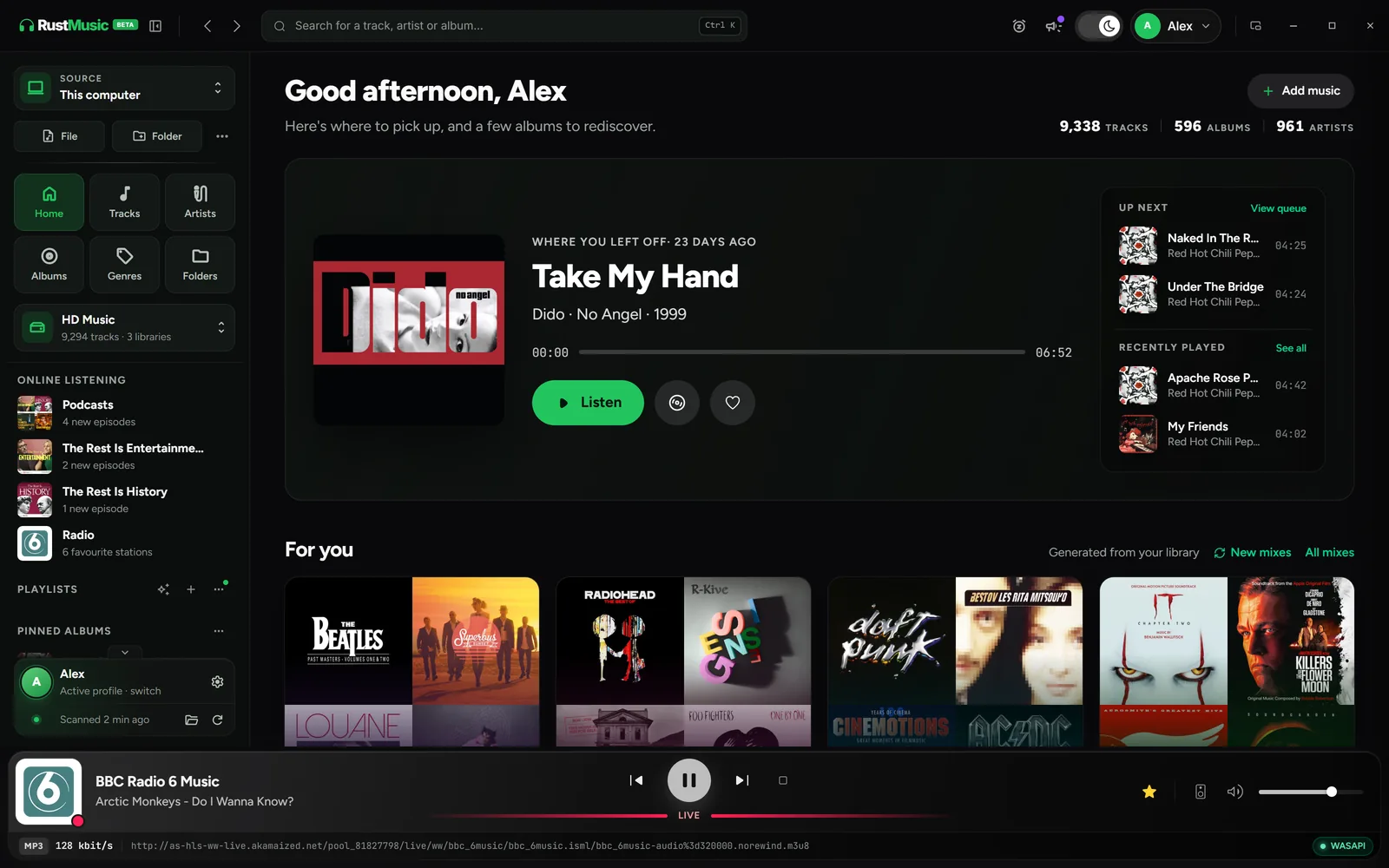
RustMusic is a desktop music player for Windows, macOS and Linux. It starts from your own files (FLAC, ALAC, WAV, AIFF, DSF/DFF, MP3…) and presents them as album and artist pages, mixes and smart playlists. On the computer’s outputs, playback is bit-perfect in exclusive mode.
Music can also leave the computer: UPnP/DLNA network players, Sonos speakers and AirPlay devices (in beta), a DLNA server for your amplifiers and TV, and a remote for Onkyo, Pioneer and Integra amplifiers (in beta). The app is free, open source (GPL-3.0) and works without an account.
What RustMusic gives you
Album and artist pages
An album page groups tracks by disc and shows the label and release date read from the tags, plus the artist’s other albums and similar albums. An artist page gathers their portrait, discography, all their tracks and the “Appears on” section for records they guest on.
Daily mixes and smart playlists
The Mixes tab brings together daily mixes, genre mixes and decade mixes. Smart playlists fill themselves from rules (rating, play count, format, genre or any tag), with 8 ready-made presets.
Network players, Sonos and AirPlay
In beta, your UPnP/DLNA players, Sonos speakers and AirPlay devices show up in the “Audio output” menu. A network player receives the file as is, with no conversion; over AirPlay 1, RustMusic sends the sound in CD quality (16-bit / 44.1 kHz).
A built-in DLNA server
Turn on sharing, and your amplifier, TV or their app can browse the library by artist, album or folder, with cover art. Files are sent as is, and pause and seeking work from the device.
Amplifier remote
In beta, a panel tucked along the edge of the window controls Onkyo, Pioneer and Integra amplifiers on your network: power, volume, sources, listening modes, bass and treble, zone 2.
Free, open source, no account
RustMusic is free and open source (GPL-3.0), with no account, no ads and no telemetry. It installs on Windows, macOS (Apple Silicon and Intel) and Linux.
Getting started with RustMusic
- 1
Install RustMusic
Download the installer for Windows (.exe), macOS (universal .dmg) or Linux (.deb, .rpm or AppImage). No account is required: the app opens straight away.
- 2
Add your music folders
Create a library and add your folders: internal drive, external drive or NAS. RustMusic reads your files and their existing tags without changing them, unless you edit the tags.
- 3
Turn on the network features you need
In Settings → Network & DLNA, turn on playback to a network player, AirPlay or the DLNA server: everything is off by default. The amplifier remote is turned on separately, in Settings → Remote.
Frequently asked questions
Is RustMusic free?
Yes. RustMusic is free and open-source software, under the GPL-3.0 license: anyone can use it, study its code, modify it and redistribute it. There is no account to create, no subscription, no ads and no telemetry.
Can I keep Roon installed alongside it?
Yes. RustMusic installs separately and reads your files without changing them, unless you edit the tags.
Which network devices does RustMusic support?
In beta, RustMusic plays to UPnP/DLNA players (WiiM, Onkyo, Denon, Marantz, Yamaha amplifiers and players…), Sonos speakers (up to 24-bit / 48 kHz) and AirPlay 1 devices. A password-protected device, or one that only accepts AirPlay 2, is not offered. With the DLNA server, the amplifier or TV browses your library itself.
Does RustMusic play Qobuz or Tidal?
Not for now: RustMusic has no built-in streaming service and plays your own files, from an internal drive, an external drive or a NAS. Your downloaded hi-res purchases (FLAC, ALAC, DSF/DFF…) are added like any other folder.
Is there a mobile app?
Not yet: RustMusic is a desktop app for Windows, macOS and Linux. When the DLNA server is on, your amplifier’s app can still browse the library from a phone.
Try RustMusic with your music
Free and open source, no account. It installs alongside your other players and reads your files without changing them.
Other alternative pages
Further reading
Roon is a trademark of its owner. RustMusic is an independent project with no connection to Roon: this page only describes RustMusic.