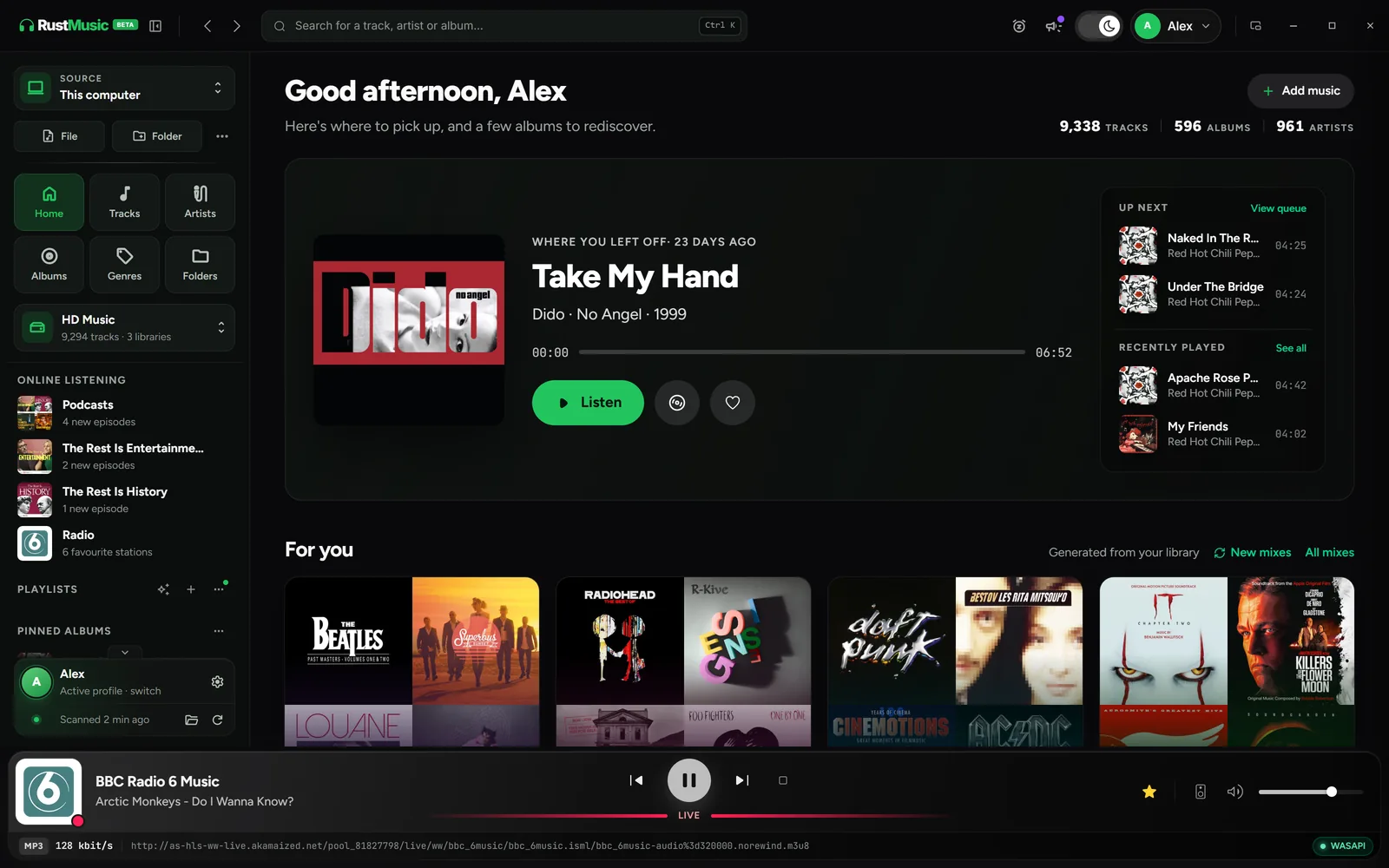
RustMusic is a free, open-source music player (GPL-3.0), with no account, no ads and no telemetry. It builds its library from your folders, whether on your computer’s drive, an external drive or a NAS, and picks up the tags and covers already in your files.
For people who take care of their collection, RustMusic offers views to browse music from several angles, smart playlists and mixes refreshed every day, a workshop to fix tags with MusicBrainz or Deezer, synced lyrics and a DLNA server. It is at version 0.3.0: some network features are still in beta, and there is no mobile app.
What RustMusic gives you
Your library from several angles
Tracks, Artists, Albums, Genres, Years, Folders: each view has its own search, filters and sorting, with A–Z navigation and columns of your choice, including the tags in your files. Several libraries and several profiles can live side by side.
Smart playlists and mixes
Smart playlists fill themselves from rules on any tag, with AND/OR groups, a limit and sorting, plus eight presets to get started. The Mixes page offers daily, genre and decade mixes; for your own, RustMusic draws 30, 50 or 100 tracks from a preset every day.
A tag workshop
Fix an album or a selection in a single table and complete it online from MusicBrainz or Deezer, with no account. Nothing is written until you confirm, and the batch history lets you roll changes back. Tags are written to MP3, FLAC, DSF and DFF files.
Synced lyrics
The “Lyrics” button shows the lyrics, synced when available. RustMusic uses a .lrc file next to the track if there is one, otherwise it looks them up on the open LRCLIB service.
A built-in DLNA server
Turn on sharing in Settings → Network & DLNA: your amplifier, TV or their app can then browse the library by artists, albums or folders, with cover art.
Windows, macOS and Linux
RustMusic installs on Windows, on macOS (Apple Silicon and Intel) and on Linux. Your files stay where they are, including on an external drive or a network share.
Getting started with RustMusic
- 1
Install RustMusic
Download the Windows, macOS or Linux version from the download page. No account is required: the app opens straight away.
- 2
Add your music folders
Create a library, then add your folders: local drive, external drive or NAS. RustMusic reads your files and picks up their tags and covers without changing them, unless you edit the tags. After adding music, “Rescan” only reads new or changed files.
- 3
Build your first smart playlist or mix
Click “Smart playlist” in the sidebar, then “Start from a preset”: “Never played”, “High resolution” or “Recently added”, to fine-tune afterwards. The Mixes page already offers daily mixes, and you can create your own there.
Frequently asked questions
Is RustMusic free?
Yes. RustMusic is free and open-source software, under the GPL-3.0 license: anyone can use it, study its code, modify it and redistribute it. It needs no account, shows no ads and sends no telemetry.
Does RustMusic run on Mac and Linux?
Yes. RustMusic is available for Windows, macOS (Apple Silicon and Intel) and Linux. On each system, bit-perfect playback in exclusive mode is available: WASAPI exclusive on Windows, CoreAudio hog mode on Mac, direct ALSA on Linux.
Can I keep MusicBee installed alongside it?
Yes. RustMusic installs separately and reads your files without changing them, unless you edit the tags. Its library, settings and downloaded covers are stored in its own data folder.
How does RustMusic find my library?
From your music folders: it reads each file’s tags and embedded cover, or a cover.jpg, folder.jpg or front.jpg file in the album folder. Folders aren’t watched continuously: after adding music, a rescan is all it takes.
Is there a mobile app?
No: RustMusic is a desktop app, and it has no built-in Qobuz or Tidal streaming. To listen elsewhere in the house, its DLNA server shares the library with an amplifier, a TV or their app; playback to UPnP/DLNA players and AirPlay 1 devices is available in beta.
Try RustMusic with your music
Free and open source, no account. It installs alongside your other players and reads your files without changing them.
Other alternative pages
Further reading
MusicBee is a trademark of its owner. RustMusic is an independent project with no connection to MusicBee: this page only describes RustMusic.