Playlists and smart playlists
Regular playlists are built by hand. Smart playlists build themselves from rules, and update as your library grows.
Up to date for version 0.4.3
Documentation
Regular playlists
Create a playlist, give it a name, a color and an icon, then add tracks from their menu or a selection. The Playlists tab shows all playlists, with search, classic / smart filters, sorting and grid or list views. The sidebar only shows pinned playlists; new playlists are pinned by default. Right-click to play, edit or delete a playlist. “Add to playlist” offers classic playlists: smart playlists fill themselves through their rules.
A playlist, “Liked tracks” and “Recently played” are shown in the same table as the library’s tracks: same columns, same sorting, same menu. “Remove from playlist” and “Remove from likes” are in each track’s menu. To declutter the sidebar, hide playlists there in Settings → Appearance → Sidebar.
Your .m3u and .m3u8 playlists can be imported: the “Import” button at the top of the Playlists page, on the “This computer” source. You can pick several files at once; each one becomes a playlist with the same name. Its tracks are found in your libraries by their path, or by their folder and file name if the list was written on another computer. A message tells you how many tracks were found, and how many are missing from the library.
The other way round, right-click a playlist, then “Export as .m3u8”: the file plays in most players. Tracks that come from a server are left out.
Smart playlists
Click “Smart playlist” in the sidebar. Build your rules: each one combines a field (rating, plays, date added, format, sample rate, genre… and any tag in your files), an operator and a value.
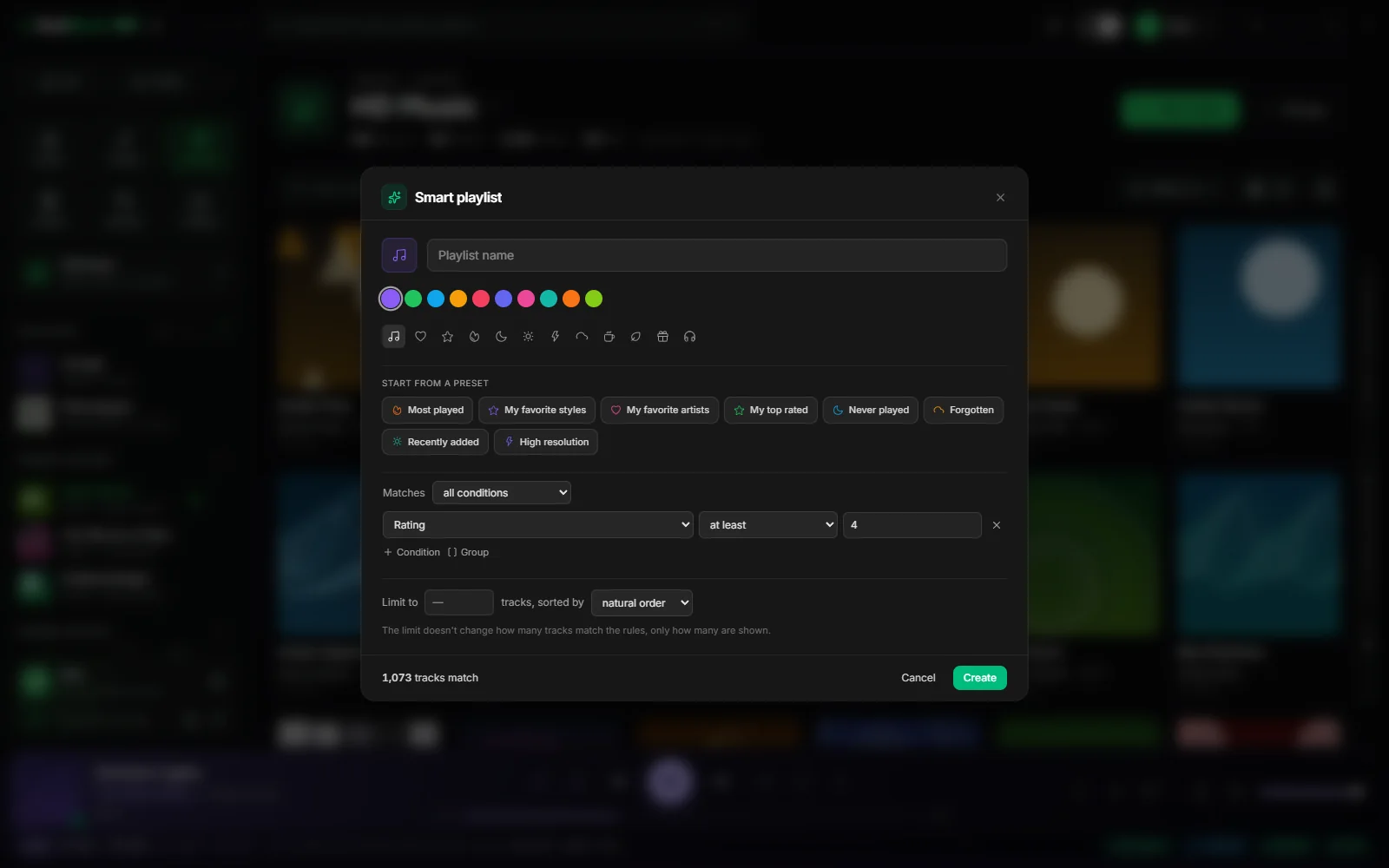
- “Matches”: all conditions, or at least one.
- “Group” nests rules for finer combinations.
- “Limit to” keeps a set number of tracks, with the sort order of your choice.
- The number of matching tracks updates as you type: you see the effect of a rule straight away.
Ready-made presets
“Start from a preset” fills the editor in one click, to fine-tune afterwards:
| Preset | What it keeps |
|---|---|
| My top rated | Your highest-rated tracks |
| Forgotten | What you haven’t played in a long time |
| High resolution | Files above CD quality |
| Most played | Your most-played tracks |
| Never played | What has never been played |
| Recently added | The latest imported files |
| My favorite artists | The artists you listen to most |
| My favorite styles | Your favorite genres |
Further reading
Question not answered?
Open an issue on GitHub: every report helps improve RustMusic and this documentation.